MenuDown
Reclaim your menubar from the notch.
MenuDown reaches menubar items hidden behind the MacBook notch —
clicking through when possible, and automatically dragging them into
view when it can’t.
Reclaim your menubar from the notch.
MenuDown reaches menubar items hidden behind the MacBook notch —
clicking through when possible, and automatically dragging them into
view when it can’t.
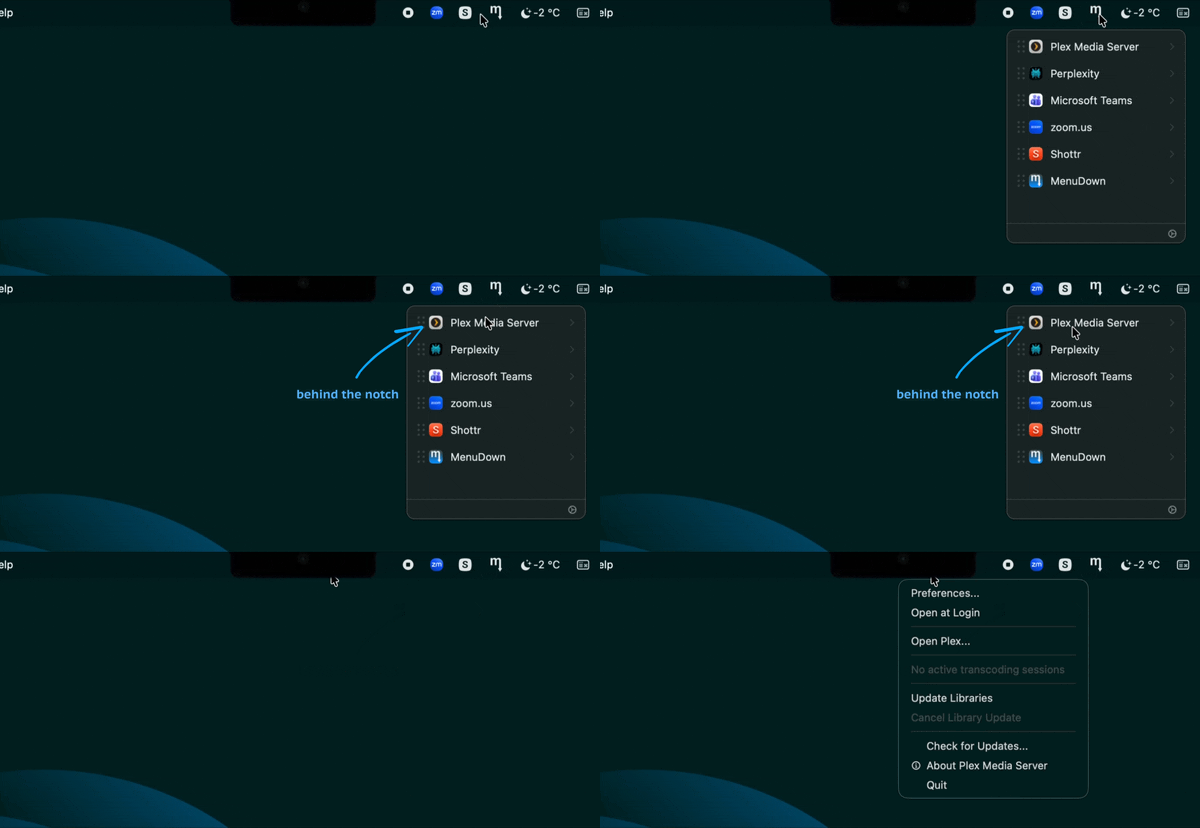
Click any item in the panel — even one hidden behind the notch. MenuDown first tries to click through directly — if that fails, it automatically drags the item into view and clicks it there. The footer shows “Revealing…” while working.
Drag to rearrange your menubar. MenuDown physically moves the real icons, intelligently exposing notch-blocked items so every icon reaches its target.
Automatically detects every third-party menubar app using the macOS Accessibility API — including items hidden behind the notch.
When a foreground app's text menus overlap your status icons, MenuDown temporarily clears them so clicks and drags always land on the right target.
All your third-party menubar items in a clean vertical list — no more guessing what's hidden behind the notch.
No network access, no analytics, no telemetry. Runs entirely on-device. Native Swift with minimal memory footprint.
Requirements: macOS 13 Ventura or later. Requires Accessibility permission on first launch.
MenuDown is free and open source under the MIT license.